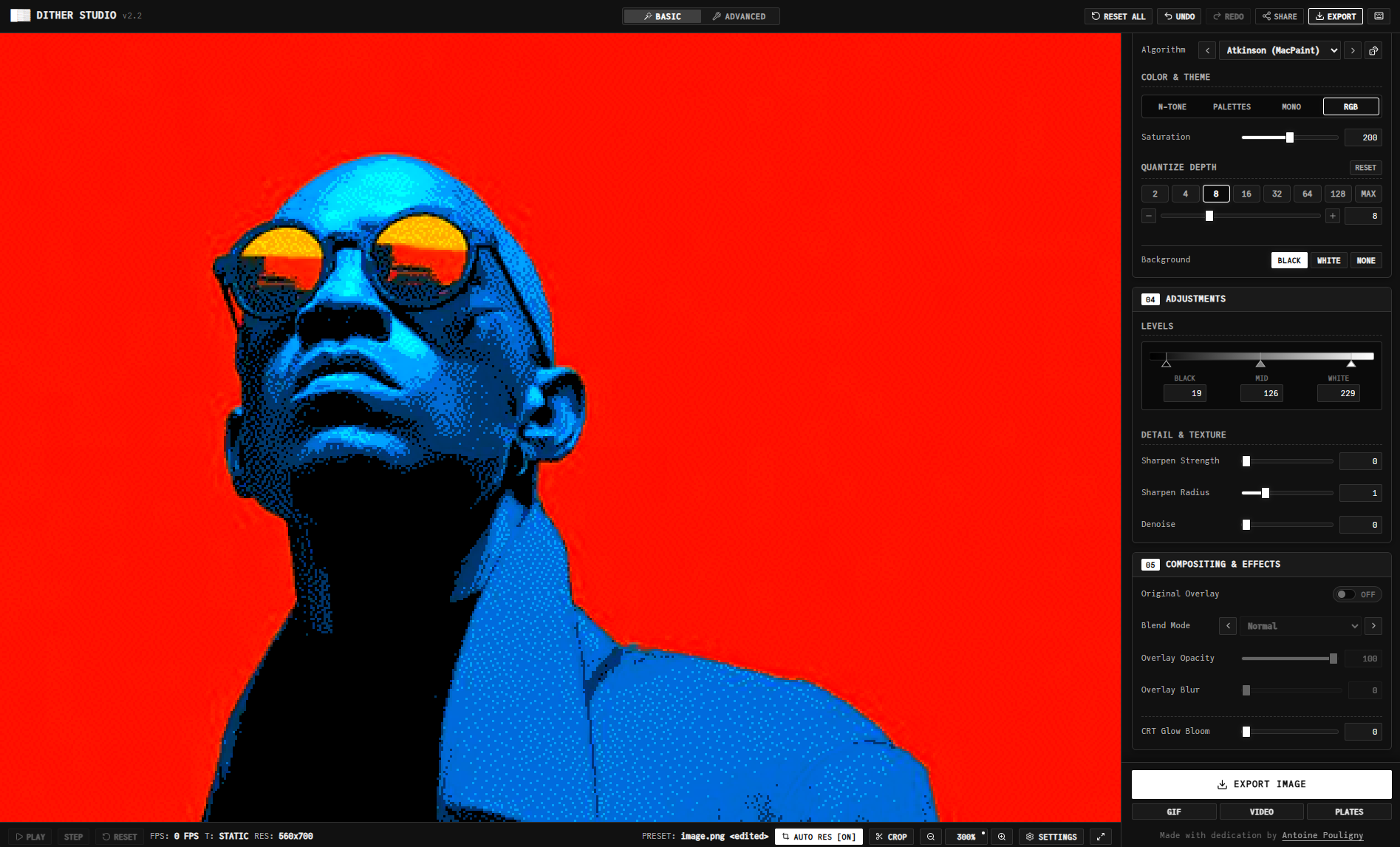
Dither Studio started as a weekend experiment: I wanted a small interactive ASCII wave toy following up on my vibe coding projects. But as I kept adding features, it quickly snowballed into something much bigger.
Today, it’s a full-fledged in-browser dithering and raster studio. You feed it an image, a video, a 3D model, or a procedural wave, and it converts it into ASCII, Braille, halftone screens, classic 1-bit dithering, or an analog CRT beam scan. You can then export clean vector SVGs, PNGs, animated GIFs, MP4 videos, or print-ready color separation plates.
No accounts, no backend, no tracking. Everything runs 100% locally in your browser: studio.pantoine.com.
From ASCII Toy to Raster Studio
If you look at the commit history starting August 17th, the project changed names four times in eleven days. It began as ASCII Animation Builder, a simple canvas turning a parametric wave field into text, before becoming ASCII Wave Generator with GIF and video export. Two days later it was ASCII Studio, with 3D model rendering via Three.js, webcam input, and custom image uploads.
The real turning point came when I started implementing classic dithering algorithms like Bayer matrices, Floyd-Steinberg, Atkinson, and halftone dots. I realized ASCII was just one specific dithering matrix among dozens. Maintaining separate renderers made no sense, so on August 24th I scrapped the siloed code and rebuilt everything around a single unified raster engine under the name Dither Studio. Over 220 commits later (mostly after 6 PM on weekdays), it reached v2.3.
Design Decisions
As a product designer, the UI architecture, interaction details, and tactile feel are what I care about most. With over 40 controls, cramming everything into a sidebar gets messy fast. I organized the layout into a strict sequential pipeline from top to bottom: Source → Output Mode → Palette & Aesthetics → Levels & Adjustments → Compositing. The interface directly mirrors how the image is processed under the hood.
To keep it approachable without crippling advanced use cases, I avoided creating a stripped-down “simple mode” that secretly resets your tweaks. Both Basic and Advanced modes share the exact same reactive state; toggling between them simply changes the view density without losing any parameters.
Resolution handling was another headache. Manual resolution sliders are frustrating across different screen densities, so the app dynamically solves for an optimal grid resolution based on your viewport, source aspect ratio, and real-time frame render times. The moment you touch any resolution input, it smoothly hands over full manual control.
Visually, a rounded and bubbly SaaS interface felt completely out of place for an app producing grainy, raw textures. I committed to an intentional terminal aesthetic: monospace typography with JetBrains Mono and JuliaMono, crisp borders, small-caps badges, direct numeric inputs instead of finicky sliders, and physical-feeling toggles.
Beam Mode (Rutt-Etra Scan)
This is probably my favorite feature in the whole studio.
It’s an analog video synthesis technique made famous by the Rutt-Etra video synthesizer and the classic Joy Division Unknown Pleasures cover. Instead of a pixel grid, it sweeps horizontal scanlines across the canvas and displaces them vertically based on luminance.
Because this is pure geometry rather than pixel quantization, it branches off the pipeline early and generates true vector polylines. When you export to SVG, you get continuous <polyline> paths ready to send straight to an AxiDraw or pen plotter.
Under the Hood
The app is built with React 19, TypeScript, Vite, Three.js for 3D scenes, Canvas 2D for rasterization, gifenc for GIF encoding, and WebCodecs for hardware-accelerated video exports.
Every mode, effect, and export is driven by a single core function (processRasterFrame) in a zero-allocation render loop for smooth 60 FPS performance. The full architecture is documented in pipeline.md and vector-pipeline.md.
AI agents (Antigravity and Claude Code) handled the code scaffolding, boilerplate, and math implementations, allowing me to focus entirely on product design, UX flow, and visual tuning.
What’s Next
The feature set is solid, so my focus now is refinement. I want to curate the 44 algorithms down to a tighter selection of high-quality dithers, add an interactive loupe tool to inspect pixel patterns up close, and build a split-screen view to compare algorithms and palettes side by side.
Beyond that, I’m working on onboarding presets for quick results and a dedicated landing page to transition Dither Studio from a weekend experiment into a polished public tool.